
The short answer
Your business may be missing from AI answers because your pages don’t answer questions clearly and early, lack structured data or topical authority, have crawl issues, or target queries that rarely trigger AI Overviews. Google’s new Generative AI report in Search Console now shows your AI Overviews and AI Mode impressions by page, country, device and date, but not clicks or ChatGPT visibility.
For the past year or so, you’ve probably felt it before you could prove it: fewer people clicking through from Google, more of them apparently getting their answer without ever landing on your site. You couldn’t point to a number. You just had a hunch that AI Overviews and AI Mode were eating into your visibility, and no clean way to check.
The hunch had data behind it. Pew Research Center found that when a Google AI summary appeared, users clicked a traditional search result in 8% of visits, compared with 15% when there was no summary, and clicked a link inside the summary itself only 1% of the time.
That changed this year. Google rolled out a dedicated Generative AI performance report inside Search Console, first announced June 3, 2026, and expanded to every website worldwide by August 31, 2026. For the first time, site owners can see exactly how often their pages are showing up inside Google’s AI-generated answers, separate from regular search results.
This post walks through what the new report actually shows, where it falls short, and what to do if you check it and don’t like what you see.
What Google’s new AI report actually shows
The report lives inside the existing Performance section of Search Console, as a dedicated view alongside your regular Search and Discover data. It covers three AI surfaces: AI Overviews, AI Mode, and the generative AI features inside Discover.
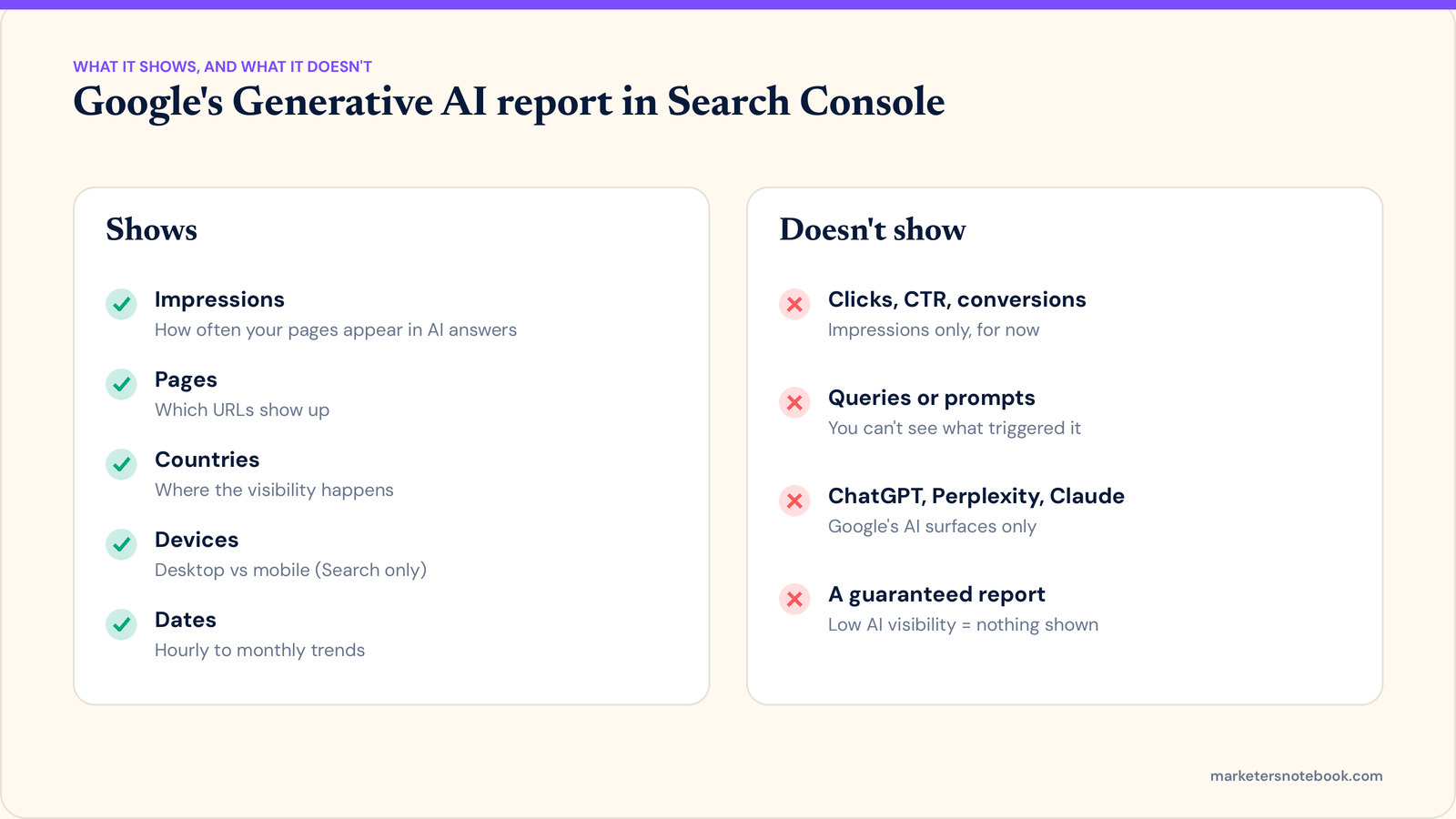
For each of those, you can see:
- Impressions. How often URLs from your site appeared inside an AI-generated answer.
- Pages. Which specific URLs are the ones showing up.
- Countries. A geographic breakdown of where that visibility is happening.
- Devices. Desktop versus mobile, available for Search (not yet for Discover).
- Dates. Hourly, daily, weekly, and monthly trends, so you can see whether visibility is rising or falling over time.
This data isn’t a separate silo. It’s still counted inside your overall Search performance, Google has simply added a dedicated lens for the AI-generated slice of it, something that was previously impossible to isolate.
Google also introduced a related control that lets site owners opt out of appearing in these generative AI features entirely. Google has stated that opting out does not affect rankings in traditional search results, it only removes a site from AI Overviews, AI Mode, and AI features in Discover.
What the report doesn’t show
Before you get too excited, it’s worth being clear about the limits, because a lot of the coverage of this launch oversold it.
- No click data. You get impressions, not clicks, CTR, or conversions. You’ll know you showed up, not whether anyone acted on it.
- No query or prompt visibility. You can’t see which search or question triggered your page to appear. You get pages, countries, devices, and dates, nothing more granular.
- Google only. This report covers Google’s own AI surfaces. It has no visibility into ChatGPT, Perplexity, Claude, or any other AI platform your customers might be using to research your business.
- Not guaranteed to appear immediately. If your site has low AI impressions, or is excluded from generative AI features for some reason, the report may simply not show up in your account, which isn’t a technical bug so much as a sign there’s little AI visibility to report on yet.
Why your business might not be showing up
If you check the report and see almost nothing, a few common causes are worth ruling out first:
- Your content isn’t structured for extraction. AI systems tend to pull from pages that answer a specific question clearly and early, not pages that bury the answer three paragraphs into a long introduction.
- Thin or missing structured data. Schema markup (FAQ, HowTo, Article) gives AI systems a cleaner signal about what your page is actually answering.
- Not enough authority signals for that specific topic. AI Overviews tend to lean on sources that already show strong topical relevance and external validation, not just any page that mentions the keyword.
- Indexing or crawl issues. If Google isn’t crawling a page often, or it isn’t indexed cleanly, it can’t be pulled into an AI answer regardless of how well it’s written.
- The topic itself rarely triggers an AI Overview. Not every query surfaces a generative answer. Some searches still return standard blue links only, so zero AI impressions on certain pages may simply reflect that reality, not a problem with your content.
How to check your own visibility this week
- Open Search Console and look for the new Generative AI performance view under the Performance report for Search (and Discover, if applicable).
- Check your impressions trend over the past few months. Rising, flat, or falling tells you whether this is a growing channel or a shrinking one for your site.
- Look at which pages are appearing. Compare that list to the pages you’d expect, your highest-value service or product pages, and note any obvious gaps.
- If the report isn’t showing up at all, don’t assume it’s broken. Confirm you’re looking at the right property, check whether you’ve opted out of generative AI features, and consider that very low AI impressions may just mean the report has nothing to display yet.
- Remember this only covers Google. For visibility inside ChatGPT, Perplexity, or Claude, you’ll need a separate GEO monitoring tool or a manual, regular check of how your business is described when someone asks those tools about your industry.
Frequently asked questions
Does this report show me clicks from AI Overviews, not just impressions?
No. At launch, the report only shows impressions, pages, countries, devices, and dates. Google has not added AI-specific click or conversion data.
Why can’t I find the Generative AI report in my Search Console account?
It could be a few things: you’re checking the wrong property, your site has opted out of generative AI features, or your site simply hasn’t earned enough AI impressions yet for Google to populate the report. A missing report isn’t automatically a technical fault.
Does opting out of AI features hurt my regular Google rankings?
Google has stated that the opt-out control only removes a site from AI Overviews, AI Mode, and AI features in Discover. It does not function as a ranking signal for standard search results.
Can I use this report to track how I show up in ChatGPT?
No. This report is specific to Google’s own generative AI surfaces. Visibility in ChatGPT, Perplexity, or other AI assistants requires separate tools or manual spot-checks, since none of that data flows through Search Console.
Is a drop in AI impressions always a bad sign?
Not necessarily. AI Overviews don’t appear for every query, so a dip could reflect a shift in which queries are triggering generative answers rather than a drop in your content’s quality. Look at it alongside your overall Search performance before drawing conclusions.
Wrap-up
For months, AI visibility has been something you could feel but not measure. Now there’s at least a baseline. Pull up the report this week, see where you actually stand, and use the gaps you find to prioritize what to fix first, rather than guessing.
Have you checked your Generative AI performance report yet? What did you find, any surprises (good or bad)? Drop it in the comments.