
Meta AI ads tools can now do more of the work in your ad account, and soon they’ll be able to change budgets, targeting and creative from a simple prompt. Picture opening Ads Manager on a Tuesday morning to find your AI assistant has drafted three new creative variants, proposed a budget shift on two campaigns, and queued a performance report for review. For a small business owner already stretched across marketing, operations, and everything else, that sounds like relief.
Here’s the catch: “can” and “should” are different questions. Letting Meta AI ads features run your account isn’t a technology question, it’s a delegation decision, the same kind you’d make before handing a new hire the keys to your ad account. You wouldn’t give a first-week employee unsupervised control over your budget and your audience targeting on day one. The same caution applies here, just faster and with fewer tells that something’s gone wrong.
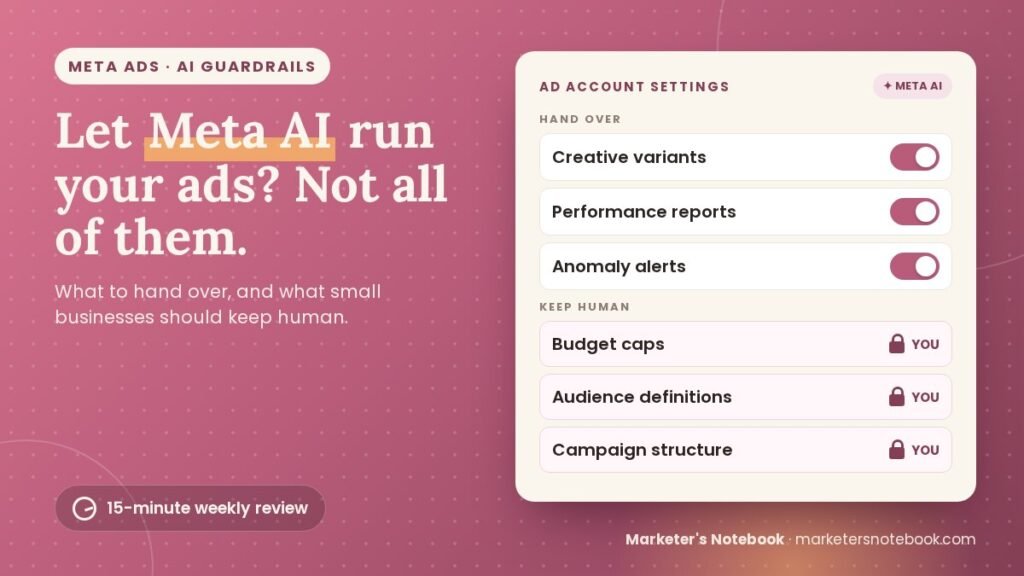
Quick answer: With Meta AI ads, hand over the work that’s expensive in time but cheap to get wrong: creative variants, scheduled reports and anomaly alerts. Keep budget caps, audience definitions and final campaign structure human until you’ve watched the AI earn trust. Then review every AI change in a 15-minute weekly check.
What can Meta AI ads tools actually do now?
Before deciding what to delegate, it helps to know exactly what’s live and what’s still being tested. At Advertising Week New York on October 6, 2026, Meta announced a bundle of AI ad tools (Social Media Today’s coverage and MediaPost’s write-up both cover the details). Sorted by status:
- Available now: video ads generated from your static product images in Advantage+ creative, and Customer Lifecycle Strategy, which lets you set goals for new, existing and lapsed customers.
- Being tested (“soon”): agentic actions in the Meta AI business assistant, meaning it can set up a campaign, generate creative, update targeting or change a budget from a conversational prompt, with previews and approvals. Scheduled tasks and alerts, such as weekly summaries and budget review reminders, are in testing too.
- For connected tools: the Meta Ads MCP server now lets outside AI agents stage work as drafts inside Ads Manager, under the permissions you grant.
None of this is bad news. Creative variation, reporting and routine optimization are exactly the repetitive work AI is good at, and the kind of work a solo marketer or a two-person team doesn’t have hours for every week. The risk isn’t the capability. It’s treating “Meta AI ads tools can do this” as the same thing as “they should do this unsupervised.”
Why “can” isn’t the same as “should”
Think of this the way you’d think about onboarding a new team member. You’d give them real responsibility quickly, because that’s how people grow into a role. But you’d also keep a short list of decisions that stay with you until there’s a track record of good judgment: anything involving money, anything hard to reverse, anything that defines who you’re trying to reach.
AI ad tools don’t build trust the way a new hire does, through visible judgment calls you watch and approve over time. They act instantly and at scale, which means a bad call doesn’t cost you one mistake, it costs you a weekend of mistakes compounding while you weren’t looking. That’s the real argument for guardrails on Meta AI ads: not that the AI is incompetent, but that unsupervised speed turns small errors into expensive ones before you notice.
The Meta AI ads guardrail checklist: what to hand over, what to keep human
Here’s the practical split. Treat it as a starting checklist, not a permanent rule, and revisit it as you build confidence in how the tool behaves on your account.
Hand this over to Meta’s AI
- Creative variants. Let the AI generate and test multiple ad versions, including the static-to-video conversions. This is low-risk exploration, and more variants tested faster is a real advantage.
- Performance reports. Scheduled reporting doesn’t need a human in the loop to execute, only to read the output.
- Routine alerts. Let the AI flag anomalies (a sudden cost spike, an underperforming ad set) so you’re not manually checking dashboards every day.
Keep this human
- Budget caps. Set the ceiling yourself with an account spending limit, and approve any AI-proposed budget change before it goes live, at least until you’ve watched it operate for a few weeks.
- Audience definitions. Who you’re targeting reflects your actual customer lifecycle (new buyers, repeat customers, win-backs), context the AI doesn’t have unless you’ve given it explicitly and completely. Keep this decision yours.
- Final campaign structure. Let the AI suggest changes to structure or targeting, but approve each change yourself rather than letting it ship automatically.
The pattern underneath every Meta AI ads decision: hand over the work that’s expensive in time but cheap to get wrong, and keep the decisions that are expensive to get wrong even once.
How to review Meta AI ads changes in 15 minutes a week
Handing tasks to AI doesn’t mean walking away from them, it means changing how you check in. A short weekly routine keeps you in control of your Meta AI ads without putting you back on daily dashboard duty:
- Review the change log. What did the AI adjust or propose this week, and why (if a reason is available)?
- Spot-check one AI-generated creative variant against your brand guidelines and the accuracy of your actual offer.
- Confirm budget and audience settings are still what you set, not what the AI nudged them toward.
- Read the scheduled report for anything that doesn’t match what you’d expect from the week’s activity.
Fifteen to twenty minutes, once a week, is enough to catch a problem before it becomes a pattern, without undoing the time savings that made delegating worthwhile. If you like this kind of weekly AI-assisted review, the same approach works for your team updates too: see how to automate your weekly status update with Slack and AI.
Setting up Meta AI ads guardrails without losing a weekend
If this checklist sounds right but you don’t want to spend a weekend configuring it, your Meta AI ads review is worth automating once and reviewing weekly after. A simple version: connect the Meta Ads MCP server to a scheduled task that pulls your weekly ad report and change log into one place, so your Monday review is reading a summary instead of hunting through Ads Manager.
That’s a smaller project than it sounds, and it’s the difference between “I’ll get to reviewing the AI’s changes eventually” and actually doing it every week. Before you connect anything, my guide on how to choose AI marketing tools covers the questions to ask about access and permissions first.
FAQ
Is it safe to let Meta AI ads tools manage my budget?
Not without a ceiling you set yourself and a weekly review. Set an account spending limit, let the AI propose changes within it, and approve budget changes yourself rather than letting the AI adjust the ceiling.
Can Meta’s AI change my budget and targeting on its own today?
Meta announced conversational budget, targeting and creative changes in October 2026 as a feature it is beginning to test, with previews and approvals, so many accounts won’t have it yet. Video from static images and Customer Lifecycle Strategy are already available.
What’s the biggest risk of letting Meta AI ads run unsupervised?
Speed. A bad targeting or budget decision that would take a human days to fully execute can be live across every campaign within hours, which is why the weekly review matters more than it would with a human manager.
Does Meta’s AI understand my actual customers?
Only what you’ve told it. Audience definitions should reflect your real customer lifecycle (new, repeat, win-back), which is context you need to provide and maintain, not something the AI infers reliably on its own.
Should I turn off all Meta AI ads features until I trust them more?
You don’t have to go that far. Start with the lower-risk tasks (creative variants, reporting, alerts) and keep the higher-stakes decisions (budget, audience, final structure) human until you’ve watched the AI get the lower-risk tasks right.
How much time does the weekly review take?
Fifteen to twenty minutes if you’ve got a change log and a report to glance at. Longer the first few times while you’re learning what “normal” looks like for your account.
Conclusion
Meta AI ads tools can now do real work on your ad account: generating creative, running reports, and, as testing expands, adjusting budgets and targeting on request. That’s a legitimate time-saver for a small business without a dedicated ads team. But delegation without review isn’t automation, it’s just hoping nothing goes wrong while you’re not looking.
Hand over the creative variants, the reports, the routine alerts. Keep the budget caps, the audience definitions, and the final call on campaign structure human, at least until you’ve watched the AI earn that trust. Build the fifteen-minute weekly review into your routine, and you get the time savings without finding out about a problem a week too late.
What’s one Meta AI ads feature you’ve turned on, or are holding off on? Tell me in the comments; I’m curious where other small business owners are drawing this line.